Usage in Console
On this page
Open Usage to see how resource consumption changes in your current workspace. Choose 7 days, 14 days, or 30 days, then use the charts and daily tables to find changes worth investigating. Each reporting period spans 24 hours; period timestamps are displayed in your local time.
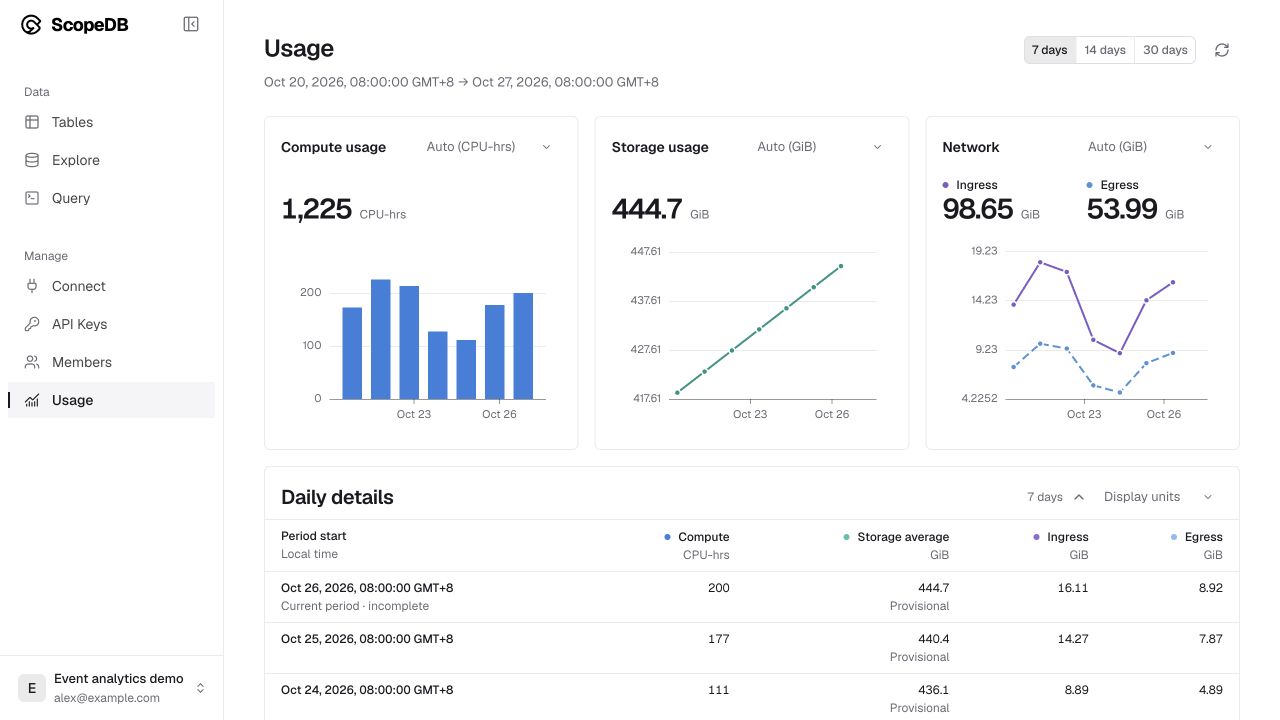
Read the three sections
- Compute usage shows daily compute consumption. Compare a spike with changes in ingestion, queries, or table maintenance during that period.
- Storage usage shows Storage average, the average compressed storage footprint for each day. It is a daily average, so it can differ from a table's current size.
- Network separates Ingress, data received by the workspace, from Egress, data returned to clients.
Leave each unit selector on Auto for readable values, or choose a fixed unit when comparing days. Use Refresh to reload the report.
Open Daily details for exact daily values. Current period · incomplete marks a period still in progress. Storage marked Provisional may be updated; Settled identifies a finalized storage value.
Investigate a change
If storage keeps growing, open Tables, check the large tables' statistics, and decide how long their data is useful. Set data retention explains how to expire older stored data.
If compute grows, look at the queries and ingestion activity for that period. For common investigations, select only the fields you need, narrow the time range, and consider indexes for recurring filters. The storage guide explains how those choices affect query work.
If data transfer grows, check whether producers are sending more events or clients are returning larger results. Review projections and result limits before exporting large datasets.