Analyze Bluesky activity
On this page
Related contents
What happened in a community activity window: new posts, replies, or reactions to existing content?
Keep a Go program running as it subscribes to Bluesky and writes arriving events through the Go SDK. While it runs, use a 16-event constructed sample to check the analysis, then investigate the continuously arriving live activity with the same queries. The sample distinguishes six new posts, including two replies, from five like or repost creations; replaying it leaves those analysis counts unchanged.
Allow about 20 minutes after workspace setup. The fixed sample uses fictional accounts and content; it demonstrates the workflow before you depend on a live stream.
1. Get the collector and connect
You need a ready ScopeDB Cloud workspace, Go 1.26 or later, Git, and a terminal (macOS, Linux, or WSL). Use a test workspace: this tutorial creates guide_bluesky.events_raw and the guide_bluesky.events view in the default scopedb database.
Clone the Demo Scene repository and enter the Bluesky project. It pins github.com/scopedb/goscopedb to v0.7.0 and the WebSocket library to v1.8.15.
git clone https://github.com/scopedb/demo-scene.git scopedb-demos
cd scopedb-demos/bluesky-events
go mod download
If you already cloned the repository, enter its bluesky-events directory instead. The program, sample, saved queries, and tests live together there.
Keep this terminal open. In Console, open Connect in your workspace and copy ScopeDB API.
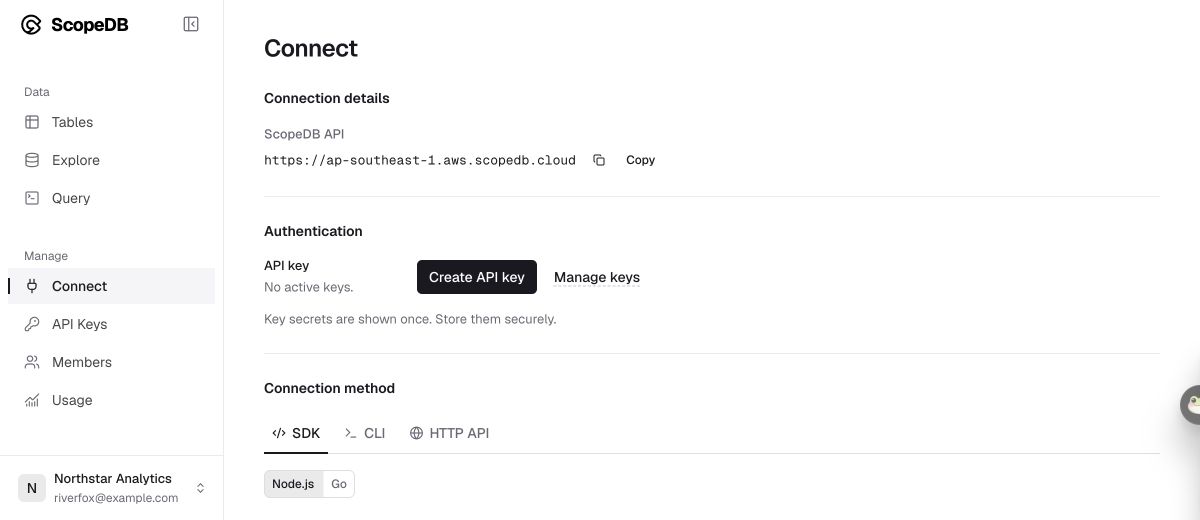
Choose Create API key, give it a name such as event-tutorial, and choose an expiration. Select Create Key and copy the one-time secret. The connection walkthrough covers setup in more detail.
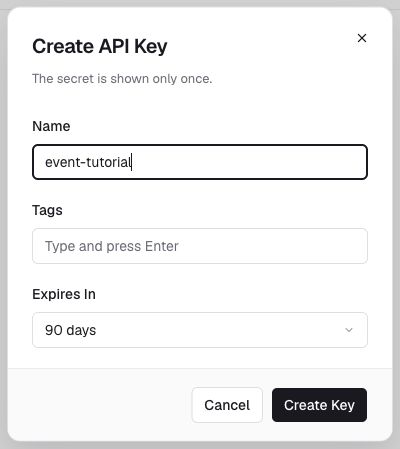
Set the address and secret in your terminal:
export SCOPEDB_ENDPOINT="https://<endpoint>"
export SCOPEDB_API_KEY="<api-key>"
Keep credentials in your local environment, outside source control. Your Console sign-in does not authenticate the collector. The live producer uses the public Jetstream service without a Bluesky account or key. The fixed sample remains available even if that live connection is temporarily unavailable.
2. Prepare the table and start the live program
In the same workspace, open Query and run each statement separately using Run:
CREATE SCHEMA IF NOT EXISTS guide_blueskyCREATE TABLE IF NOT EXISTS guide_bluesky.events_raw (
capture_id string,
event_id string,
event_time timestamp,
ingested_at timestamp,
collection string,
operation string,
raw object
)CREATE OR REPLACE VIEW guide_bluesky.events AS
FROM guide_bluesky.events_raw
DISTINCT ON capture_id, event_id BY ingested_at DESC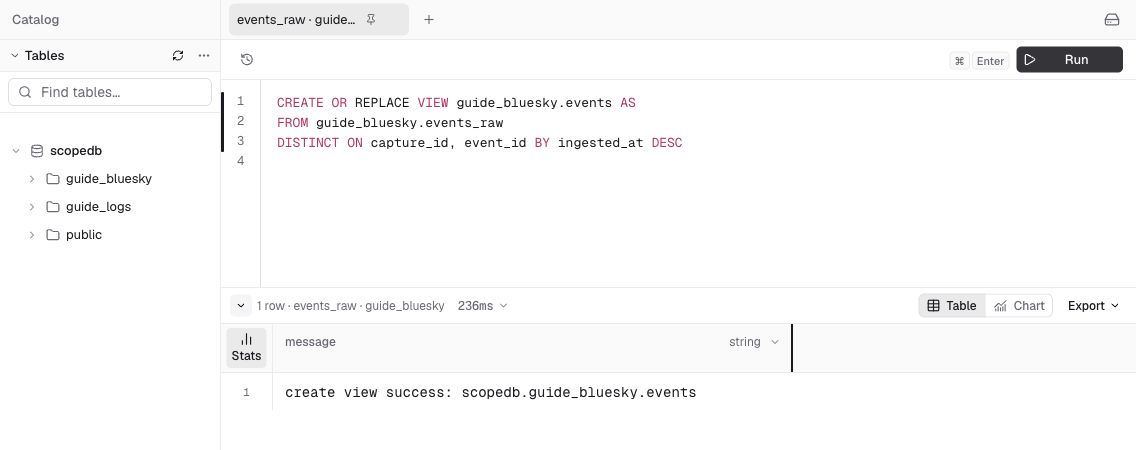
The table keeps every imported delivery and the original payload in raw. The view selects the latest delivery of each event within a capture. Use that view for analysis so replaying a saved file does not inflate its counts.
Start the program and keep this terminal open while you work in Console:
go run .On its first run, it writes the 16 constructed events under capture ID first. If that sample is already complete, it reuses it. The program then keeps receiving public events and appending them through the Go SDK under live-first. It flushes at least once per second while data is buffered, or when a batch reaches 500 events. There is no repeated capture/load step.
The output reports confirmed deliveries, such as Committed 500 events for capture live-first. Counters and timing depend on live traffic. Press Ctrl+C when you want to stop; the program flushes the remaining batch before exiting.
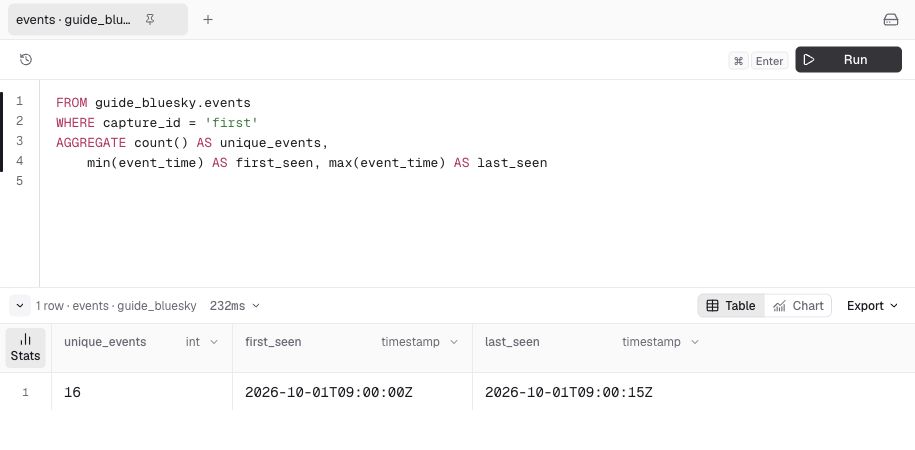
Leave the producer running for the rest of the tutorial. First check the reproducible sample in Console:
FROM guide_bluesky.events
WHERE capture_id = 'first'
AGGREGATE count() AS unique_events,
    min(event_time) AS first_seen, max(event_time) AS last_seen
Expect 16 events, observed from 2026-10-01T09:00:00Z through 2026-10-01T09:00:15Z. These fixed timestamps keep the sample reproducible; the queries filter by capture ID instead of a relative “last 15 minutes” window.
3. Check the analysis with the fixed sample
Start with record creations by collection:
FROM guide_bluesky.events
WHERE capture_id = 'first' AND operation = 'create'
GROUP BY collection
AGGREGATE count() AS creates
ORDER BY creates DESC, collection| collection | creates |
|---|---|
| app.bsky.feed.post | 6 |
| app.bsky.feed.like | 3 |
| app.bsky.feed.repost | 2 |
| app.bsky.graph.follow | 2 |
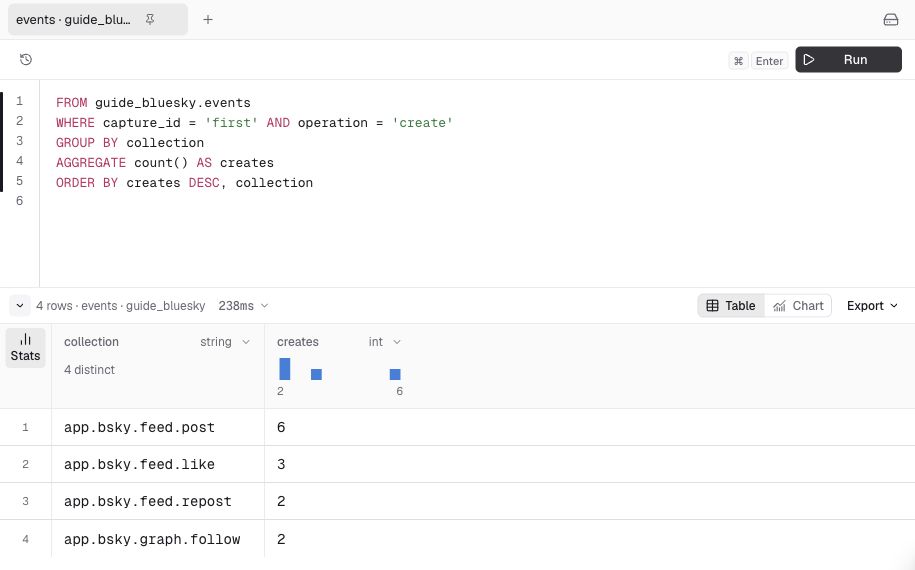
The remaining three mutations are one update and two deletes. Counting every post mutation as a new post would overstate activity.
Now ask whether the new posts start or continue conversations, and what formats they contain:
FROM guide_bluesky.events
WHERE capture_id = 'first'
    AND collection = 'app.bsky.feed.post' AND operation = 'create'
SELECT raw['record']['reply'] IS NOT NULL AS is_reply,
    TRY(raw['record']['embed']['$type']::string) AS embed_type
GROUP BY is_reply, embed_type
AGGREGATE count() AS posts
ORDER BY posts DESC, is_reply, embed_type
Two of the six new posts are replies. Across both reply groups, two posts have image embeds, one has a link embed, one has a video embed, and two have no embed. Replies can include images, so reply counts and format counts are overlapping descriptions of the same posts.
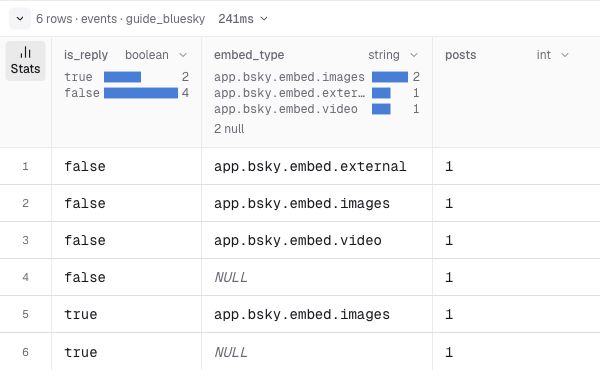
TRY returns NULL when the nested value is missing or cannot be converted. Inspect that bucket before treating it as “text only.” The query describes the outer embed type, rather than every format nested inside a quoted record.
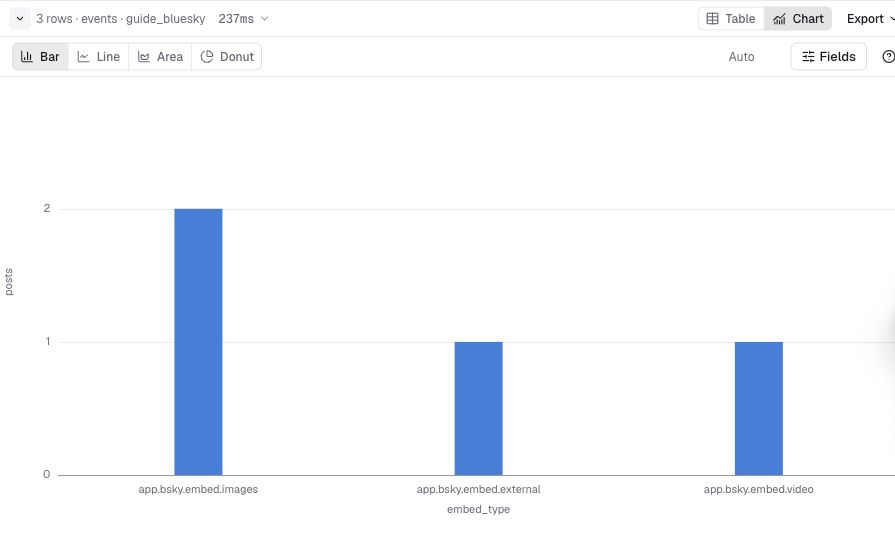
To make a chart, group named formats without splitting replies:
FROM guide_bluesky.events
WHERE capture_id = 'first'
    AND collection = 'app.bsky.feed.post' AND operation = 'create'
SELECT TRY(raw['record']['embed']['$type']::string) AS embed_type
WHERE embed_type IS NOT NULL
GROUP BY embed_type
AGGREGATE count() AS posts
ORDER BY posts DESC, embed_type
In the results toolbar, select Chart, then Bar. Use embed_type as the category and posts as the value. Expect image = 2, external link = 1, and video = 1. The chart excludes the two posts with no embed; it does not measure which format attracts more engagement.
4. Check what the reactions target
Three likes divided by six posts is not a like rate: a reaction may refer to a post created before your capture, and you have no impression denominator.
Join reaction targets to post creations observed in this capture:
FROM guide_bluesky.events
WHERE capture_id = 'first' AND operation = 'create'
    AND collection IN ('app.bsky.feed.like', 'app.bsky.feed.repost')
SELECT collection, TRY(raw['record']['subject']['uri']::string) AS target_uri
LEFT JOIN (
    FROM guide_bluesky.events
    WHERE capture_id = 'first'
        AND collection = 'app.bsky.feed.post' AND operation = 'create'
    SELECT 'at://' || raw['did']::string || '/' || collection
        || '/' || raw['rkey']::string AS post_uri
    DISTINCT ON post_uri
) AS posts ON target_uri = posts.post_uri
GROUP BY collection
AGGREGATE count() AS interactions,
    sum(if(posts.post_uri IS NOT NULL, 1, 0)) AS targets_observed,
    sum(if(posts.post_uri IS NULL, 1, 0)) AS targets_not_observed
ORDER BY collection| collection | interactions | targets_observed | targets_not_observed |
|---|---|---|---|
| app.bsky.feed.like | 3 | 2 | 1 |
| app.bsky.feed.repost | 2 | 1 | 1 |
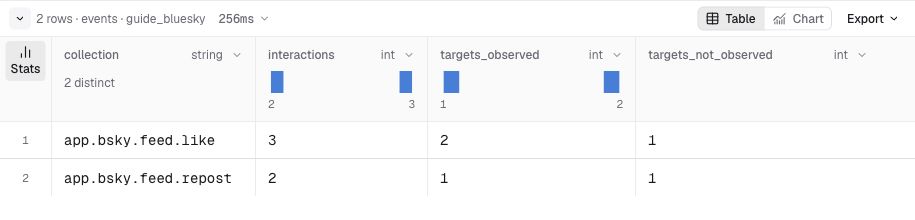
This matches URIs, not record versions or distinct audiences. An unmatched target may predate the window or be missing from the capture. Follows target accounts and are outside this comparison.
Inspect the source evidence:
FROM guide_bluesky.events
WHERE capture_id = 'first' AND collection = 'app.bsky.feed.post'
SELECT event_time, operation, raw
ORDER BY event_time
Double-click a raw cell to open Cell details. Choose JSON paths, open the JSON path selector, and select a nested field such as raw['record']['text']. Row 4 in this query is a constructed reply. Inspect record.reply and record.embed in other records as needed. A delete has no record body and cannot reveal the deleted post's text by itself.
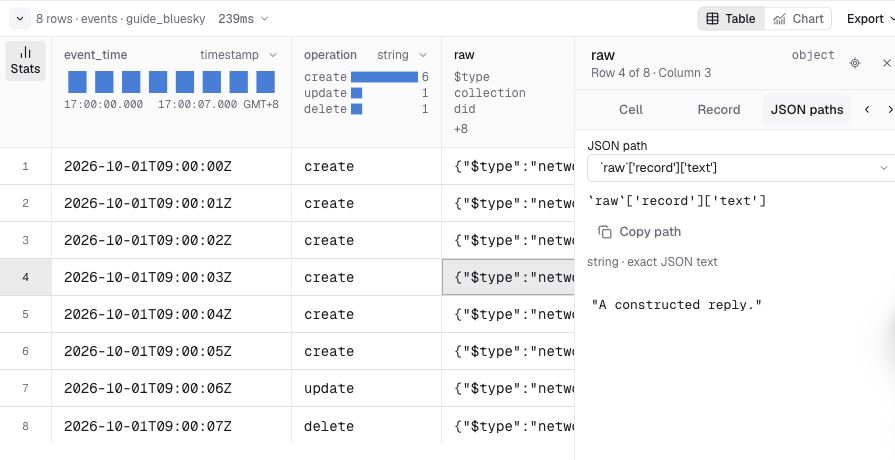
For the fixed sample, your briefing can now say: “We observed six new posts, including two replies, plus five like or repost creations. Three of those reactions targeted posts whose creation we captured.” Inspect the reply threads and unmatched targets before drawing conclusions about content performance.
5. Investigate arriving live events
The same program has been writing to capture live-first while you checked the sample. Change capture_id = 'first' to 'live-first' in the earlier queries and select Run. Run the event-count query again after a few seconds to see new deliveries included, then investigate the activity mix, replies, formats, and reaction targets.
Use the observed live results instead of the sample's numbers. Console Query keeps each execution's result until you run it again. Counts can grow or the mix can change between executions. A short observation need not include every category. Keep public payloads outside source control and share aggregate findings when full content is unnecessary.
To compare a second observation, press Ctrl+C in the producer terminal, then restart with a new label:
go run . -capture-id live-secondThe fixed sample is reused, earlier data remains available, and new live events are written under live-second. Keep this second producer running while you compare new posts and their reply share:
FROM guide_bluesky.events
WHERE capture_id IN ('live-first', 'live-second')
    AND collection = 'app.bsky.feed.post' AND operation = 'create'
GROUP BY capture_id
AGGREGATE min(event_time) AS first_seen, max(event_time) AS last_seen,
    count() AS posts,
    sum(if(raw['record']['reply'] IS NOT NULL, 1, 0)) AS replies
SELECT *, 100.0 * replies / posts AS reply_percent
ORDER BY capture_id
A window with no new posts has no row. Compare reply shares alongside the time coverage and counts: a larger count alone does not establish a higher activity rate when observations span different durations. A higher reply share suggests inspecting ongoing threads, rather than assuming a burst of new topics. Run the query again to include newly committed events in the active observation.
6. Verify replay and keep the observation limits clear
Run these two count queries separately:
FROM guide_bluesky.events_raw
WHERE capture_id = 'first'
AGGREGATE count() AS stored_rows
FROM guide_bluesky.events
WHERE capture_id = 'first'
AGGREGATE count() AS unique_eventsReplay the fixed sample using the same capture ID:
go run . load -file sample.ndjson -capture-id firstRun the two count queries again after the replay. On the first replay, stored rows increase from 16 to 32 while unique events stay at 16.
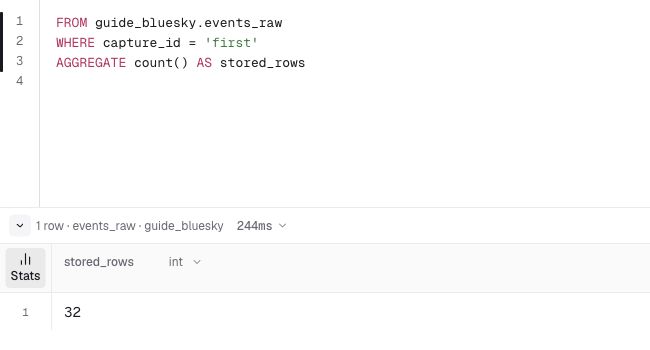
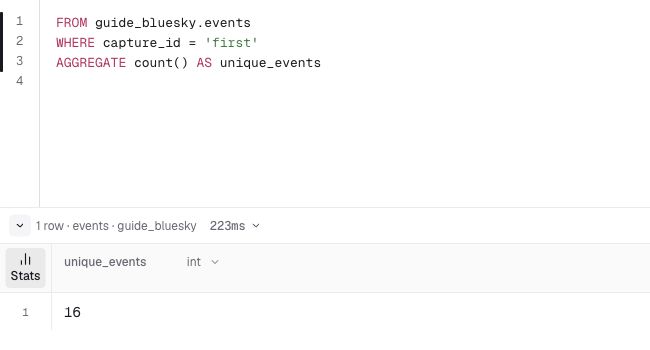
The view deduplicates reads; it does not remove stored rows. After an interrupted import, fix the failure and replay the same file with its original capture ID. Earlier batches may already have committed, and a lost response may follow a successful write. The loader stops on an unconfirmed write instead of retrying automatically.
event_id identifies a mutation using the source instance and sequence number. A post's create, update, and delete are different events. capture_id labels a live observation or a saved input file; keep it unchanged when replaying a recovery file. The view deduplicates within each capture, so do not sum overlapping captures and assume global deduplication.
event_time uses the source's observation timestamp (witnessedAt, falling back to time), rather than the author's record.createdAt. ingested_at is the loader's UTC timestamp, rather than a commit time or an end-to-end latency measurement. Original fields remain in raw.
During a process, a lost source connection is retried against the same instance from the last confirmed sequence. The source cursor is inclusive, so the view may remove repeated deliveries. After a process restart, the program starts from the live tip; it does not persist a restart checkpoint or backfill gaps beyond the source's retention. Earlier payloads remain stored after a delete event. This is an activity demo rather than a maintained current-state mirror.
A failed SDK append stops the producer and saves its unconfirmed batch to a temporary recovery file. Inspect the error, fix the cause, and replay that file with the original label:
go run . load -file <recovery-file> -capture-id live-firstThe SDK owns the append contract and reports rejected or unknown outcomes. This program does not automatically replay a write with an unknown outcome; the view keeps an explicit recovery replay from inflating analysis counts. Events arriving while the producer is stopped are outside its observation.
Continue with Query events to adapt the investigation, Model event data to promote frequently queried payload fields, or Set data retention to limit stored history.
Troubleshooting
| Symptom | Next step |
|---|---|
| Connection unavailable | Check outbound WebSocket access. The producer retries the same source; stop it and use a new capture ID before changing to another source instance. |
401 or 403 during writes | Check the API address, key, expiration, and selected workspace. |
| Setup query fails | Run the three setup statements in the workspace belonging to the key. Use Refresh catalog if the table list is stale. |
| Counts do not change | Check that the producer is still running and reporting commits, select the live capture ID, and select Run again in Console. |
| SDK append fails | Keep the printed recovery file. Fix the failure, then use load with that file and its original capture ID before restarting. |
| Empty live result | Check the capture ID and commits. A short observation need not contain every category. |
| Sample replay has more rows | Raw rows include previous deliveries; the analysis view should still contain 16 unique events for capture first. |