# Query in Console
[Read this page in HTML](https://www.scopedb.io/docs/guides/console-query)
Open **Query** when you want to write ScopeQL or continue an investigation from **Explore**. The editor is above the results, with **Catalog** beside it to help you find tables and fields.
## Run a query
With the [quickstart](https://www.scopedb.io/docs/guides/quickstart.md) table available, paste this query into the editor:
```scopeql
FROM scopedb.public.events
WHERE service = 'checkout'
SELECT time, name, message
ORDER BY time DESC
LIMIT 20
```
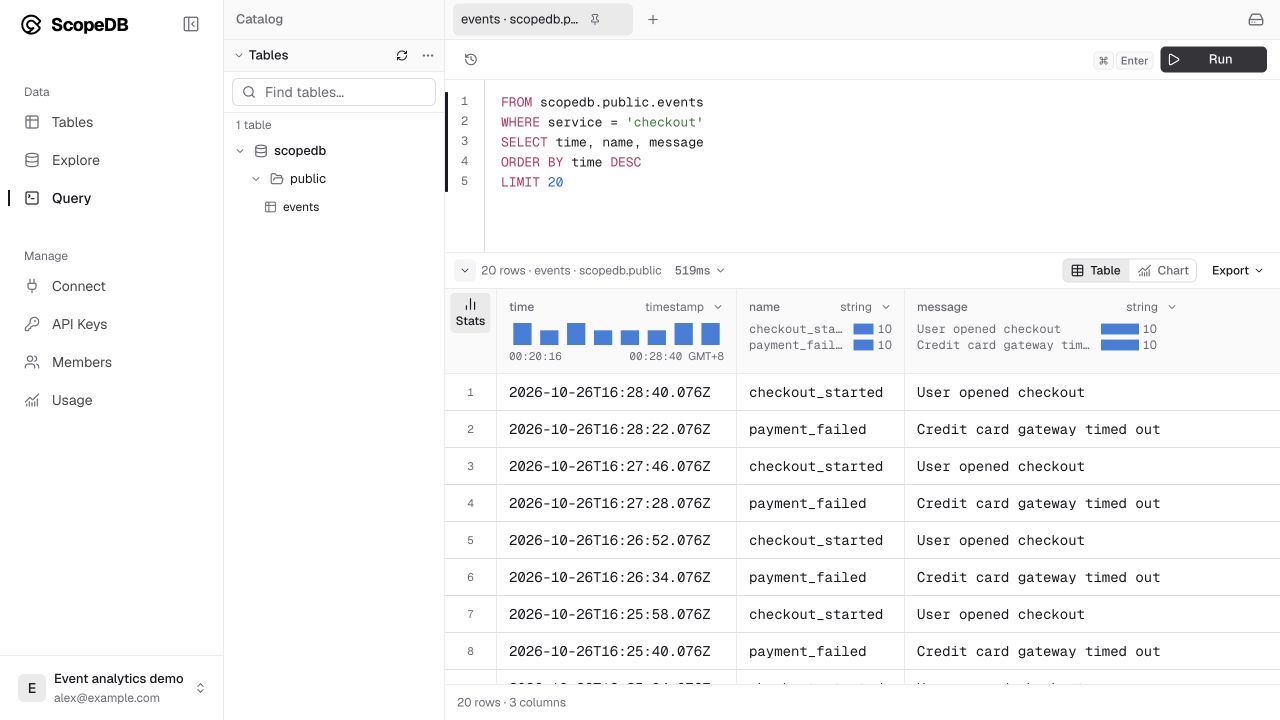
Select **Run**, or press **Cmd+Enter** on macOS or **Ctrl+Enter** on Windows and Linux. Check the result rows below the editor. Use **Cancel** to stop waiting for an active query.
[](https://www.scopedb.io/content/docs/console/query-results.jpg)
Run a statement in the editor and inspect its result below. The Catalog stays beside your query.
If you arrived from **Explore** using **Open in Query**, the editor already contains a query for that view. Edit it and run it to inspect the new result.
## Find tables and keep related work together
Expand a database and schema in **Catalog** to find a table and its column types. Use catalog search when the workspace has many tables. Refresh the catalog after creating a table or changing columns elsewhere.
Create a tab for each investigation and rename tabs to make them easy to find. Drafts and tabs are remembered in this browser for the workspace. When a tab contains several statements, select the statement you want to execute before choosing **Run**.
Open **History** to revisit a previous run. Choose an entry to bring its statement back into the editor, then review it before executing it again. Rerunning a statement that writes data performs that write again.
## Read, chart, and export results
Open a result cell to inspect a long string or nested object. Switch to **Chart** when the returned columns form a useful comparison or time series, then choose the chart type and map its fields.
Use the result actions to **Copy JSON**, **Download CSV**, or **Download TSV**. Exports contain the returned result, including any limit in your query. For example, the query above exports at most 20 rows.
## Change a table or run a recurring analysis
Run the examples in [model event data](https://www.scopedb.io/docs/guides/model-flexible-events.md), [add indexes](https://www.scopedb.io/docs/guides/add-indexes.md), or [set data retention](https://www.scopedb.io/docs/guides/data-retention.md) here. Check the workspace and table name before running a change.
For recurring queries from your terminal, save the statement to a file and follow [query data with the CLI](https://www.scopedb.io/docs/guides/scopedb-cli/query.md).